
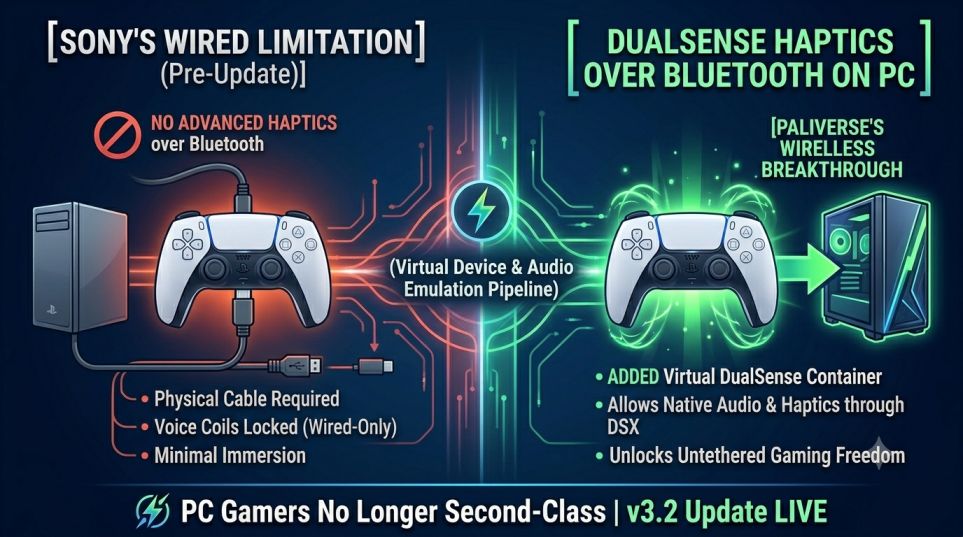
For years, PC gamers utilizing the best controller by Sony were faced with a frustrating compromise. The voice coil actuators built into the PlayStation 5 controller offered the best of their kind, but to enjoy immersive haptic feedback, you had to connect the controller to your computer physically via a USB-C connection. There was zero effort made by Sony to rectify that issue, leaving players structurally disconnected from having the native console experience. However, a brand-new community update has done away with that limitation entirely, finally unlocking full DualSense Haptics over Bluetooth on PC.
DSX v3.2 Beta 01 utility is finally out and represents a definite end to this wired constraint. This new update, developed by Paliverse, targets precisely the limitation that had forced gamers to make a choice between these two features. Thanks to a cutting-edge software solution, this new patch introduces positional rumble and controller audio processing capabilities directly through wireless receiver, making use of DualSense Haptics for the first time possible via Bluetooth connection on PC.
An insight into the workings of this wireless data circuit helps us appreciate the remarkable feat of technical expertise exhibited by the community infrastructure. Windows typically has been found incapable of streaming bandwidth-intensive haptic audio packets via Bluetooth stacks without interruptions. To overcome the limitations posed by Microsoft’s operating system, the software sets up an artificial device interface that works like a hardware connection while broadcasting packets wirelessly. Now let’s take a look at the setup parameters, pricing scheme, and implementation process for this groundbreaking feature
DSX v3.2 Beta 01: Core Wireless Features and Pricing
The process of unlocking the capabilities of the advanced DualSense Haptic technology through the Bluetooth connection on a PC entails leveraging the Steam utility store system as opposed to the first-party driver setup. The basic interface functionality is obtainable in a paid application while the hardware emulation process through structural expansion takes place separately. See the following table for the pricing, models, and platforms involved in unlocking wireless voice coil haptics.
| System Asset | Distribution Channel | Official Retail Pricing | Primary Utility Function |
| DSX Base Application | Steam Store | $7.99 (One-Time Purchase) | Controller Profile Customization, Led Control, Remapping |
| DSX+ Expansion Pass | Steam DLC | $3.99 (One-Time Purchase) | Creates Virtual DualSense & Emulates Wireless Haptics/Audio |
| v3.2 Beta 01 Update | Steam Beta Branch | Free (Requires Base App) | Enables Virtual DualSense Audio Tracking Over Bluetooth |
How the Virtual DualSense Update Works
The key architectural achievement within the new v3.2 release is the design of a Virtual DualSense component directly coupled with the built-in audio routing system. Once a supported game running on a computer outputs localized audio waves for depicting steps, rainfall, or gun kicks, the application detects the streams in real-time. Thus, it guarantees that the DualSense Haptics over Bluetooth on PC work natively in premium games without the need to connect messy hardware cords from room to room.
Moreover, the new architecture revolutionizes the user workflow layout by removing any software background overhead. Specifically, the new version introduces a highly efficient card-based user interface layout, refines advanced button configuration profiles, and discontinues the unnecessary constant connection check with the Steam back-end server. For users who want to optimize their DualSense Haptics over Bluetooth on PC setup, the updated driver comes with a unique ownership cache mechanism that works independently.
Virtual Audio Routing: Simulates an equivalent data flow for a wired PlayStation console system straight via ordinary system sound cards.
Streamlined UI Management: Offers a card-based user interface design that enables you to modify your controller color display and toggle controls instantly.
Offline Credential Security: Has a 28-day credential caching feature, which allows you to run the driver setup on your system without running Steam. Duplicate Controller Detection: Incorporates auto triggers that will hide devices in order to avoid registering duplicates on the operating system.
User Configuration Guide: Switching to the Beta Branch
Activating DualSense Haptics via Bluetooth for PC gaming can be accomplished in under five minutes if you have the required base software applications installed. Since the wireless audio conversion application is now live in its beta version testing period, users will need to choose to opt-in for the feature via their games’ client settings. Here is how it can be done easily:
- Open Steam Client application on your computer and go to your Software Library area.
- Right-click DSX and choose Properties then click the Betas tab layout option.
- Choose the dropdown selection menu to opt-in to the [beta – beta] version update.
- Run the utility and choose Virtual Device Options and activate the DSX+ DLC virtual box.
- Pair your PlayStation remote via Bluetooth and enable Virtual DualSense with Audio.
My Opinion & Conclusion: Is It Worth the Price?
Despite Sony’s years-long history of bringing their biggest AAA games to PC, they’ve consistently neglected to properly offer any form of wireless functionality to use with their expensive $70 equipment. Spending $12 total to activate Steam integration for DualSense Haptics via Bluetooth is the most sensible choice you can make as a couch gamer.
At long last, the time has come for Paliverse to fully deliver on the dream of ultimate gaming flexibility which enthusiasts have been longing for ever since the advent of PlayStation 5 hardware. Being able to hear spatial sound and feel unique voice-coil haptic feedback without any cable limitations makes gaming giant visuals on monitor and television sets a more comfortable experience than ever before. Update your controller firmware, switch to the beta branch, and enjoy unlimited immersion now!
Frequently Asked Questions (FAQs)
Q1. Does Sony officially support wireless haptic feedback on PC?
No, Sony does not officially support adaptive triggers or advanced audio-driven haptic feedback over a wireless Bluetooth connection on PC. Officially, these premium immersive features remain locked behind a hardwired USB-C cable setup unless you use third-party tools like DSX
Q2. Is the DSX v3.2 Beta update free to download?
The v3.2 Beta 01 system update itself is completely free for anyone who already owns the software. However, to actually execute DualSense Haptics over Bluetooth on PC, your setup requires both the base DSX application ($7.99) and the required DSX+ DLC extension ($3.99) to build the virtual controller container.
Q3. Do haptics work over Bluetooth in every PC game?
The wireless feature functions perfectly in games that feature native, built-in DualSense hardware support (such as Horizon Forbidden West, Cyberpunk 2077, and Marvel Rivals). The utility mirrors the official developer haptic audio streams wirelessly, meaning the game itself must have native support for Sony’s haptic engine.
Read Also
Read Also: Play Final Fantasy 16 on PS Plus